Sandboxels: Complete Guide to the Free Falling Sand Simulation Game
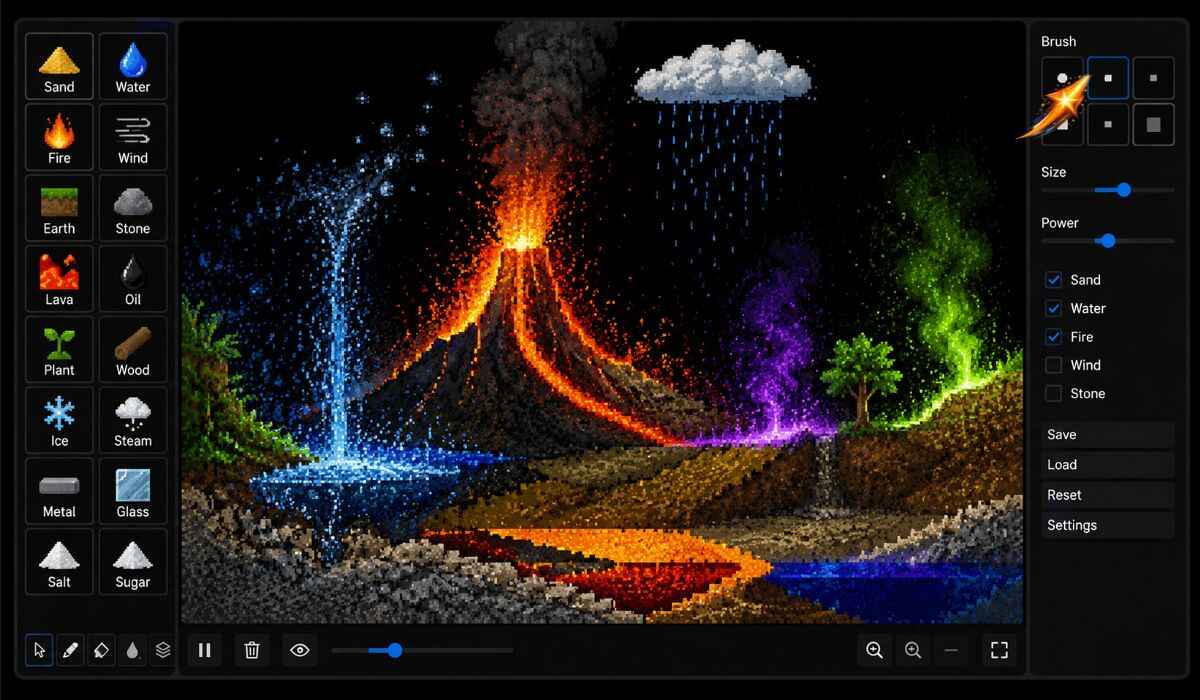
Sandboxels is a free falling-sand physics simulation game developed by R74n that runs instantly in any web browser with no download and no account required, featuring over 500 unique elements across categories including liquids, powders, gases, solids, electricity, fire, plants, animals, and special materials that interact with each other through thousands of physics-based reactions including heat simulation, density, chemical reactions, cooking, and fire spread, turning a simple blank canvas into an endlessly experimental science playground where every pixel you place behaves according to its physical properties and every combination produces a genuinely different outcome.
Released as a free browser game in 2021 and later expanded to Steam with Workshop support for saving and sharing canvases, sandboxels has built a dedicated following among casual players, STEM educators, creative builders, and simulation enthusiasts who appreciate its rule-dense design where each new interaction opens doors to five more possibilities rather than quickly reaching a creative ceiling.
This complete guide covers every element category, all physics systems, how to use the canvas and tools, the best element combinations and experiments, Steam Workshop features, educational applications, and how Sandboxels compares to similar falling sand games.
What Is Sandboxels?
Sandboxels is a free browser-based falling-sand simulation game with over 500 elements that interact through physics-based reactions including heat, electricity, density, and chemical processes.
| Detail | Answer |
|---|---|
| Developer | R74n |
| Genre | Falling sand physics simulation sandbox |
| Browser version | Free at sandboxels.r74n.com |
| Steam version | Available with Workshop support |
| Browser release | 2021 |
| Steam release | May 17, 2025 |
| Total elements | 500 plus |
| Cost | Free in browser, low cost on Steam |
| Download required | No for browser version |
| Account required | No |
| Platforms | Browser (desktop and mobile), Steam |
| Educational use | Yes, widely used in STEM contexts |
Sandboxels is a free falling-sand simulator that can be played in your browser. It features heat simulation, electricity, density, chemical reactions, cooking, and fire spread. With over 500 unique elements to play with, sandboxels is a great way to pass the time and relax. There are thousands of interactions between the many materials, plants, animals, fluids, and powders in the game.
The game is free with no ads and no pay-to-unlock content. Just a living simulation you control.
What Are Falling Sand Games?
Falling sand games are a genre of sandbox simulations where particles of different material types follow physical rules including gravity, flow, heat transfer, and chemical reaction when placed on a canvas.
The falling sand genre began in the early days of browser gaming and has maintained a dedicated audience because its appeal is fundamentally different from most games. There are no objectives, no failure states, no scores, and no progression systems. The entire experience is experimentation. You place elements, observe their behavior, combine them with other elements, and discover emergent phenomena that no tutorial describes.
Sandboxels is built differently from most sandbox or pixel simulators because it is not just content-heavy but rule-dense. Each new interaction opens doors to five more. Drop fire on a plastic object and it melts. But if that plastic comes into contact with bacteria, an entirely different chain of reactions begins. This rule-density is what keeps sandboxels engaging far beyond the initial discovery phase.
How to Play Sandboxels: Complete Guide
Accessing the Game
Visit sandboxels.r74n.com in any modern web browser on desktop, laptop, tablet, or mobile. No installation, no account, and no payment is required. The game loads directly in the browser tab and the simulation begins immediately.
The Canvas
The main canvas is your playground. Each pixel on the canvas represents a single particle of whatever element you have selected. The simulation runs automatically every frame, updating all particles according to their physical rules and interactions with neighbors.
Basic Controls
| Action | Desktop | Mobile |
|---|---|---|
| Select element | Click element in menu | Tap element in menu |
| Place elements | Click and drag on canvas | Touch and drag on canvas |
| Erase elements | Select eraser tool | Select eraser tool |
| Change brush size | Scroll wheel or size slider | Pinch or use size slider |
| Pan canvas | Middle mouse drag | Two-finger drag |
| Zoom | Scroll wheel | Pinch to zoom |
Simply click or use your touchscreen to select a category, such as Liquids, then pick an element, such as Water. Drag on the canvas to place your pixels and watch them interact with others.
Your First Experiment
Start small. Pick one material and place a tiny patch to learn its behavior. Add a second material only after you understand the first. Create shapes like floors, walls, ramps, cups, and funnels. Change one detail at a time and watch what changed. Reset when needed and try again. In a sandbox, resetting is part of learning.
All Sandboxels Element Categories
Sandboxels organizes its 500 plus elements into distinct categories that reflect their physical states and primary behaviors.
Liquids
The liquids category includes Water, Oil, Acid, Lava, and dozens of other fluid substances that flow under the influence of gravity and density. Denser liquids sink beneath lighter ones. Liquids fill containers from the bottom up. Different liquids react with each other in chemically meaningful ways. Acid dissolves most solid materials. Oil floats on water and ignites when exposed to fire.
Powders
Powders behave like granular materials, piling up in heaps and flowing at angles determined by their friction properties. Sand, Salt, Sugar, Gunpowder, and hundreds of other powder elements fall and accumulate differently based on their particle properties. Gunpowder ignites explosively from a single fire pixel. Salt dissolves in water. Sugar melts under heat.
Gases
Gas elements rise rather than fall, spreading across the available space above the surface they emerge from. Steam, Smoke, various chemical vapors, and toxic gases each spread at different rates and react differently with other elements they encounter. Steam condenses back to Water when cooled. Some gases are flammable. Others are toxic to biological elements.
Solids
Solid elements resist movement and provide structure. Wood, Metal, Glass, Stone, Concrete, and dozens of other solid materials serve as walls, containers, and construction materials. Solids have varying melting points, conductivity, and reactions to fire and acid. Metal conducts electricity and heat. Glass is transparent and fragile. Wood burns gradually.
Fire and Heat
Fire is one of the most consequential elements in sandboxels because it interacts with almost everything. Fire spreads through flammable solids and liquids, converts solids to gases through combustion, generates heat that melts nearby materials, and produces smoke and ash as byproducts. Different materials burn at different rates and produce different combustion products.
Heat simulation runs continuously beneath all visible interactions. Elements near hot surfaces heat up even without direct contact. This thermal propagation produces realistic results in which metal conducts heat away from a fire source and transfers it to connected materials far from the flame.
Electricity
The electricity system simulates electrical conductivity across materials that conduct electricity versus those that insulate. Place a battery, connect it to metal wires, and the current propagates through the circuit. Electricity heats conductive materials, ignites flammable ones it contacts, and powers special electrical elements that activate when current reaches them.
Plants and Biological Elements
Sandboxels includes a surprisingly deep biological simulation layer. Plants grow from seeds when they are placed near water and nutrients. Different plant species grow at different rates and in different patterns. Some plants produce oxygen. Others spread aggressively and crowd out other plants.
Animals and creatures interact with plants and each other according to predator-prey dynamics. Set balloons on fire, cook eggs, let a virus spread through the pile and cure it with a vaccine. Biological elements create emergent ecosystem behavior that no other falling sand game simulates with the same depth.
Special Elements
The special category includes elements that do not fit neatly into physical state categories but produce some of the most dramatic interactions in the game. Virus elements spread through biological materials. Vaccine elements cure infected areas. Nuclear elements release massive energy. Clone elements duplicate whatever they touch. Void elements destroy everything.
Best Sandboxels Element Combinations and Experiments
The rule-density of sandboxels means that every combination you discover suggests five more to try next.
Fire and Ecosystem Experiment
Build a small ecosystem with soil, water, plant seeds, and small animal elements. Observe the natural growth and predator-prey dynamics. Then introduce a single fire pixel at one edge. Watch how the fire spreads through flammable plant material, how animals flee or perish, and how steam rises from water that boils at the fire boundary.
Cooking Experiment
Sandboxels includes cooking mechanics where food elements transform when exposed to the right heat levels. Place flour, water, and heat sources in the right combination to bake. Place eggs near heat to cook them. The cooking system creates satisfying cause-and-effect chains between common culinary elements.
Electricity Circuit Experiment
Place a battery element and connect it to a network of metal elements. Add a light element at the circuit’s endpoint. Watch the current propagate through the metal network and illuminate the light. Interrupt the circuit by removing one metal pixel and observe the current stop. This experiment demonstrates electrical circuit principles in a visual and interactive way that no textbook diagram replicates.
Acid Destruction Experiment
Build a layered structure using different solid materials including stone, metal, wood, and glass. Pour acid from the top and observe how different materials resist or dissolve at different rates. Metal resists longer than wood. Stone resists more than glass. The differential dissolution creates genuinely surprising emergent shapes.
Petri Dish Experiment
Create a petri dish environment with nutrients and biological organisms. Watch as bacteria grow, organisms multiply, and ecosystems develop. Some creatures hunt others, creating predator-prey dynamics within the confined nutrient space. Introduce a virus and watch it spread through the biological colony, then apply vaccine to control the outbreak.
Sandboxels on Steam: Extra Features
The Steam version of sandboxels launched on May 17, 2025 and provides several features beyond the free browser version.
Steam Workshop support allows players to browse and publish saved canvases directly in-game. The Workshop has become a destination for sharing creative builds, impressive experiments, and artistic pixel simulations that other players can download and interact with.
Unlimited save file management removes the save slot restrictions of the browser version, allowing players to maintain extensive libraries of saved canvases for different experiments, builds, and artistic projects.
The Steam version plays identically to the browser version in terms of physics, elements, and interactions. Players who primarily want the gameplay experience without community sharing features lose nothing by using the free browser version.
Sandboxels in Education
Sandboxels has many applications in education, particularly for STEM subjects where it provides visual, interactive demonstrations of physics, chemistry, and biology concepts.
Unlike textbook problems, sandboxels rewards hypothesis testing. It encourages curiosity without scoring failure. That is what makes it perfect for STEM outreach, especially in schools where hardware is limited but browsers are available.
Specific educational applications include:
Physics: Gravity, density, pressure, heat transfer, and wave propagation all demonstrate through particle behavior in ways that static diagrams cannot replicate.
Chemistry: Chemical reactions between elements, phase transitions between solids, liquids, and gases, combustion, acid-base reactions, and dissolution demonstrate continuously and interactively.
Biology: Ecosystem dynamics, predator-prey relationships, pathogen spread and vaccine response, and plant growth under different environmental conditions all arise from interactions among biological elements.
Engineering: Students can build structures and test their stability, design containers and test their capacity, create circuits and test their conductivity, all through immediate visual feedback rather than theoretical calculation.
Sandboxels vs Similar Falling Sand Games
| Feature | Sandboxels | Powder Game | Noita | The Powder Toy |
|---|---|---|---|---|
| Browser playable | Yes | Yes | No, download only | Yes |
| Total elements | 500 plus | 25 plus | Hundreds | 200 plus |
| Heat simulation | Yes | Limited | Yes | Yes |
| Electricity system | Yes | No | Yes | Yes |
| Biological elements | Yes, deep system | No | No | Limited |
| Cooking mechanics | Yes | No | No | No |
| Steam Workshop | Yes | No | Yes | No |
| Free | Yes, fully | Yes | No, paid | Yes |
| Educational use | Yes, noted by developers | Limited | No | Moderate |
| Mobile support | Yes, browser | Limited | No | No |
Sandboxels differentiates itself from similar games through its depth in biological elements, cooking mechanics, educational positioning, mobile browser support, and the Steam Workshop community. The Powder Toy offers more technically precise chemistry simulation for advanced users but lacks sandboxels’ accessibility and biological systems. Noita uses a similar falling sand engine but is a fully developed roguelike game rather than a pure sandbox.
Tips for Getting the Most From Sandboxels
Start with basic elements before complex combinations. Place water, sand, and fire separately before combining them. Understanding how each element behaves individually makes combined experiments far more predictable and interesting.
Use the brush size tool strategically. Large brushes create massive simultaneous placements that fill areas quickly for background construction. Small brushes provide precision for experiment design and detail work. Switch between sizes regularly rather than defaulting to a single size.
Build containers before placing liquids. Liquids spread immediately when placed on an open canvas. Build your walls and containers from solid elements first, then add liquids into the contained space to observe controlled rather than chaotic behavior.
Let experiments run without interruption. Many of the most interesting sandboxels reactions take several seconds to fully develop. After placing your elements, resist the urge to add more immediately. Watch what happens over 10 to 30 seconds before intervening.
Use the eraser to create experiment boundaries. If one reaction is getting out of hand, use the eraser to create a barrier between experiments rather than clearing the entire canvas. Compartmentalized experiments produce cleaner observations.
Save interesting configurations. Both the browser and Steam versions allow saving canvas states. When you produce an interesting configuration that could serve as a starting point for future experiments, save it before continuing rather than risking losing it.
Frequently Asked Questions About Sandboxels
What is sandboxels?
Sandboxels is a free falling-sand physics simulation game developed by R74n. It runs in any web browser with no download required.
Players place over 500 different elements including liquids, powders, gases, solids, fire, electricity, and biological elements on a canvas and observe their physics-based interactions including heat simulation, chemical reactions, and fire spread.
How many elements does sandboxels have?
Sandboxels features over 500 unique elements across categories including liquids, powders, gases, solids, fire, electricity, plants, animals, and special elements. Thousands of combinations of interactions exist among these elements.
Is sandboxels free?
Yes. Sandboxels is completely free in the browser version at sandboxels.r74n.com with no ads, no pay-to-unlock content, and no account required. A Steam version with Workshop support is available at a low price for players who want community sharing and unlimited save management.
Does sandboxels work on mobile?
Yes. The browser version of sandboxels works on smartphones and tablets through any modern mobile browser with touchscreen controls. No app download is required.
What makes sandboxels different from other falling sand games?
Sandboxels stands out through its 500 plus element count, deep biological simulation system with living organisms and disease mechanics, cooking system, mobile browser support, educational applications, and Steam Workshop community. Most falling sand games have fewer elements and lack the biological and cooking systems.
Is sandboxels good for education?
Yes. Sandboxels has many applications in education. It demonstrates physics, chemistry, biology, and engineering concepts interactively through particle simulation. The game is particularly useful for STEM education because it rewards hypothesis testing and encourages curiosity without failure penalties.
Who made sandboxels?
Sandboxels was developed and published by R74n. The browser version launched in 2021 and the Steam version launched on May 17, 2025.
What is the Steam Workshop for sandboxels?
The Steam Workshop for sandboxels allows players to browse and publish saved canvas configurations directly in-game. Players share creative builds, impressive experiment setups, and artistic pixel simulations that others can download and interact with.
Read Also: Licomplores: Complete Guide to the Free Fire and Mobile Gaming Platform