Google Snake Game: Complete Guide to Play, Master, and Beat Your High Score
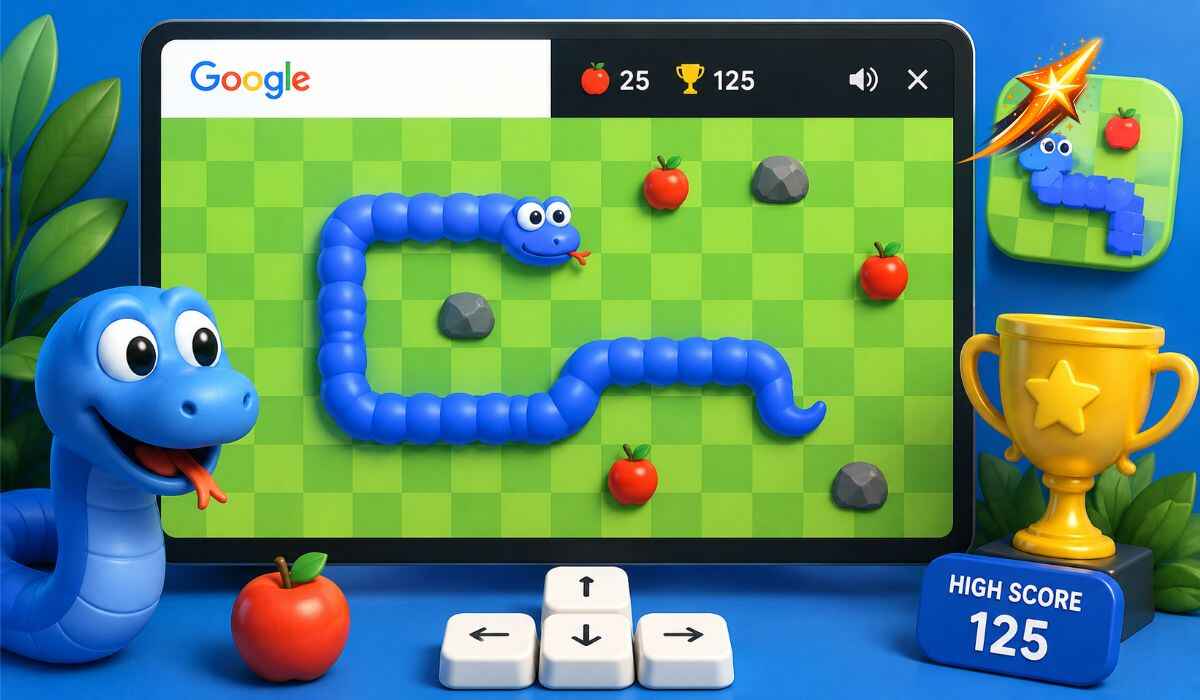
The Google Snake game is a free browser-based version of the classic Snake game embedded directly into Google Search as an Easter egg, letting you play the iconic eat-and-grow game instantly without downloading anything, creating an account, or leaving your browser, on any device including desktop computers, tablets, and smartphones.
Originally appearing as a hidden Easter egg in Google Search and later made a permanent mini-game, the Google Snake game has become one of the most played browser games on the internet, combining the nostalgia of Nokia-era Snake with multiple modern game modes, customizable maps, difficulty settings, a daily challenge feature, and a surprisingly deep skill ceiling that rewards mastery with increasingly high scores.
This complete guide covers how to find and launch the Google Snake game, all controls for desktop and mobile, every game mode available, scoring mechanics, proven high score strategies, advanced tactics, and how to play it offline.
What Is the Google Snake Game?
| Detail | Information |
|---|---|
| Game Name | Google Snake Game (also called Snake Google Game) |
| Type | Browser-based Easter egg mini-game |
| Developer | |
| Access | Search Google Snake Game on Google Search |
| Cost | Completely free |
| Download Required | No |
| Account Required | No |
| Platforms | Desktop browser, mobile browser, tablet |
| Mobile Controls | Swipe gestures |
| Desktop Controls | Arrow keys or WASD |
| Game Modes | Classic, Borderless, Portal, Dark, Turbo, and more |
| Daily Challenge | Yes, new challenge every day |
| Offline Play | Yes, available through Chrome offline |
The Google Snake game is Google’s modern remake of the classic Snake game that first appeared on Nokia phones in the late 1990s. Google re-introduced it as an Easter egg and later made it a permanent mini-game inside Google Search. It is free, browser-based, and loads instantly. Unlike the old pixelated Nokia Snake, Google’s version features smooth animations, multiple game modes, and customizable settings that add considerable depth to what appears at first glance to be a simple retro game.
History of the Snake Game
The snake game has a long and memorable history that goes back to the early arcade games of the 1970s. The original arcade version, called Blockade, was released by Gremlin Industries in 1976. It introduced the core concept of a growing line that must avoid itself.
The concept was then licensed and adapted into countless variations across home computers and arcade cabinets through the late 1970s and 1980s. The game truly entered mainstream popular culture when Nokia bundled Snake on its mobile phones in 1997, making it one of the first mobile games played by hundreds of millions of people worldwide.
Google first introduced Snake as a hidden Easter egg in Google Maps, where players could control a pixel snake navigating through actual city streets. The game was later embedded into Google Search as a dedicated mini-game that could be launched with a simple search, bringing the Snake concept to a new generation of players in a frictionless, immediately accessible format.
Despite its low skill floor, its skill ceiling is exponentially high, allowing players an opportunity to master something niche and unlike anything else. This combination of instant accessibility and deep mastery potential is what has kept Snake culturally relevant across five decades of gaming history.
How to Find and Launch the Google Snake Game
Finding the Google Snake game takes less than five seconds.
Method 1: Direct Google Search Open any browser, go to google.com, type Google Snake Game in the search bar, and press Enter. The game appears instantly at the top of the search results. Click Play to start immediately.
Method 2: Simple Search Terms You can also trigger the game by searching Snake Game, Play Snake, or Google Snake. The game widget appears directly on the search results page without requiring you to open any external website.
Method 3: Mobile Open the Google app or Chrome on your iPhone or Android device, search Google Snake Game, and the playable version appears in the search results. On mobile, swipe gestures replace arrow keys for directional control.
No download, no account, no registration. Just open and play.
Controls for Google Snake Game
Desktop Controls
| Action | Arrow Keys | WASD |
|---|---|---|
| Move Up | Up Arrow | W |
| Move Down | Down Arrow | S |
| Move Left | Left Arrow | A |
| Move Right | Right Arrow | D |
| Pause | P or Spacebar | P or Spacebar |
| Restart | Click Play Again | Click Play Again |
Both arrow keys and WASD work interchangeably. Many players find WASD more comfortable for extended sessions because it keeps the hand in the standard gaming posture.
Mobile Controls
On smartphones and tablets, swipe gestures replace keyboard keys. Swipe up to move up, swipe down to move down, swipe left to move left, and swipe right to move right. Touchscreen devices allow swiping in any direction, making it easy to play on smartphones and tablets.
How the Google Snake Game Works
The core mechanics are simple but deceptively challenging at higher lengths.
You control a snake that moves continuously in the direction you last pressed. The snake does not stop. Every moment you delay a directional input is a moment of continued movement in the current direction.
When your snake eats a food item, it grows longer by one segment. The food item disappears and a new one spawns at a random location on the board. You earn points for every food item you eat.
The game ends when your snake collides with a wall in modes where walls are fatal, or when it collides with its own body. Your score represents the total number of food items successfully eaten during that run.
You need to eat to score points, but every dot you eat makes survival a little tougher. Pay attention to how quickly the snake grows and adjust your strategy accordingly.
All Google Snake Game Modes
The settings icon in the Google Snake game lets you customize the experience with several game modes that dramatically change how the game plays.
Classic Mode
The original Snake experience. Simple, clean, and straight to the point. Walls appear around the board and hitting them ends the game. This is the most faithful recreation of the Nokia-era Snake and the mode most players begin with.
Borderless Mode
Walls are removed entirely. Your snake can pass freely off one edge of the board and reappear on the opposite side. This eliminates wall deaths and allows much longer survival at high snake lengths, making it one of the easiest modes for achieving high scores.
Portal Mode
You disappear on one side of the map and reappear on the opposite side, similar to Borderless, but with specific portal entry and exit points on each edge. Portal Mode adds a layer of spatial awareness because the relationship between entry and exit points requires different movement planning than standard Borderless.
Dark Mode
Dark Mode changes the visual theme rather than the mechanics. The background turns dark and the snake and food items adopt contrasting colors for comfortable play in low-light environments. Some game iterations offer a dark mode toggle for eye comfort during extended sessions.
Turbo Mode
The snake keeps accelerating over time, making quick reflexes essential. Turbo Mode is the most mechanically demanding game mode because all the standard strategies that work in Classic mode become significantly harder to execute at higher speeds.
Yin Yang Mode
Adds a second snake moving in the opposite direction to the first. The game ends if they crash into each other. The second snake has a color opposite to the first one. Yin Yang Mode introduces a second moving obstacle that requires simultaneous tracking of two snake positions.
Key Mode
A key shows up with a lock block on the board. Collecting the key unlocks the block and shows hidden items behind it. Hitting the lock blocks ends the game. Key Mode adds a collection objective separate from simple food eating that requires path planning around locked areas.
Poison Mode
Poison mode has two types of food: a regular fruit that increases the score and spawns a new item, and a gray poisonous fruit that makes the snake move randomly for a brief period when eaten. Accidentally eating poisonous food creates a terrifying loss of control moment that requires immediate recovery.
Sokoban Mode
This mode adds a puzzle feature where items are hidden in crates. These crates must be moved to certain spots to open them. Sokoban Mode blends puzzle-solving with Snake movement in a way that fundamentally changes the gameplay from a reaction game to a planning game.
Dimension Mode
Provides items across two dimensions. Eating items in one dimension allows interacting with items in the other. Eating continuously switches the snake’s visibility between dimensions, requiring you to track your position across two alternating visual states.
Minesweeper Mode
Eating an item creates a new mine with a specific radius around it. Mines end the game on contact, progressively filling the board with explosive hazards that accumulate with every food item eaten. Minesweeper Mode transforms the endgame into a careful navigation challenge through an increasingly dangerous minefield.
Google Snake Game Scoring System
The scoring system in Google Snake is straightforward but scales in difficulty rapidly.
Each food item you eat adds one point to your score. There is no fixed limit. The score keeps increasing as long as you keep eating food without crashing.
The challenge is exponential rather than linear. Your first 20 food items are relatively easy to collect because the snake is short and maneuverable. Your next 20 are noticeably harder because the snake’s length creates more potential collision points. By the time you reach 50 or more food items, every move requires conscious path planning to avoid blocking yourself.
Walls are also what stand between you and a perfect high score. Hitting one will end your run before the final bell can ever ring. This is why professional-level Snake players avoid cutting across the open center of the board in classic mode and instead maintain predictable patterns along the edges.
Daily Challenge Feature
The Daily Challenge feature makes the Google Snake game even more interesting. Every day, a new challenge is available for players.
These challenges may include reaching a specific score, surviving for a certain time, or playing with different speed or board settings. Each challenge has a unique objective and you can retry the challenge multiple times until you succeed or until the next day’s challenge replaces it.
The Daily Challenge encourages players to come back daily, improve their skills, and enjoy a fresh goal each time they play. A new challenge appears every day, making it a consistent reason to return even for experienced players who have already explored all the standard game modes.
Proven Strategies to Get a High Score
Strategy 1: Hug the Outer Walls
Keep your snake glued to the outer edges whenever possible. Cutting through the center of the board is a rookie mistake that usually traps your head. Moving along walls gives you predictable, safe paths and preserves the open center of the board for later when your snake is longer.
Strategy 2: The Loop Pattern
Creating a loop along the edges of the screen is an effective way to maximize your snake’s growth. This loop becomes a safe zone for collecting food items without risking collisions with the snake’s tail or the walls.
As the snake grows, you progressively spiral inward from the outside of the board, filling rows systematically rather than chasing food randomly.
Strategy 3: The Zig-Zag Pattern
When things get crowded, stop chasing food in straight lines. To actually beat the snake game at high scores, you need to force a strict zig-zag pattern. By carefully sweeping up and down in tight columns, you systematically fill the board without any risk of boxing yourself in.
Use the zig-zag pattern when your snake occupies a significant portion of the board and random food-chasing becomes likely to cause self-collision.
Strategy 4: Never Rush the Apple
There is no timer in the Google Snake game. Take the safest route, not the fastest one. Darting across the map recklessly is exactly how runs die. Always choose the longer safe path over the shorter risky path.
Strategy 5: Create and Maintain a Safe Zone
Always keep a two-block-wide escape route open. As your snake fills the board, consciously leave yourself one guaranteed safe corridor that your head can always enter without immediate danger. This escape route is your survival insurance when unexpected situations arise.
Strategy 6: Plan Ahead, Not Just the Next Move
Planning two or three moves ahead rather than reacting to the current position prevents the common trap of turning into your own tail. Think about where your head will be after the next three inputs, not just the next one.
Strategy 7: Use Slow Mode for High Scores
Fast mode feels exciting, but slow mode gives you more control and fewer mistakes. Lowering the game speed in settings directly improves your ability to execute the loop and zig-zag patterns that are necessary for reaching the highest scores.
How to Play Google Snake Without the Internet
Google Snake has an offline version available through Chrome.
When your Chrome browser loses internet connection, a dinosaur appears on the error page. Less known is that Google Snake is accessible offline through specific methods.
Some implementations of the game cache locally in your browser, meaning that after playing once with an internet connection, the game remains accessible during brief offline periods. The Daily Challenge feature requires an internet connection since it syncs with daily content servers.
For reliable offline snake gameplay, several third-party implementations are available as progressive web apps that can be saved to your home screen and launched without an internet connection.
Google Snake Game on Mobile vs Desktop
| Feature | Desktop | Mobile |
|---|---|---|
| Controls | Arrow keys or WASD | Swipe gestures |
| Screen Space | Full grid visible easily | Smaller grid on phone screens |
| Precision | Higher, keyboard is more reliable | Slightly less precise due to touch |
| Accessibility | Requires a browser with mouse or keyboard | Works on any smartphone |
| Comfort for Long Sessions | Better, more ergonomic | Less comfortable for extended play |
| Portability | Fixed location | Play anywhere |
Scoring difficulty differs by device. Touch controls on mobile introduce a small amount of imprecision compared to keyboard inputs on desktop, which affects performance at very high snake lengths where each input must be perfectly timed.
Google Snake Game vs Original Nokia Snake
| Feature | Google Snake | Nokia Snake |
|---|---|---|
| Platform | Browser, any device | Nokia mobile phones |
| Visual Quality | Smooth animations, colorful | Pixelated, monochrome |
| Game Modes | Multiple, including Borderless and Portal | Classic only |
| Controls | Keyboard, touchscreen | Phone number pad |
| Daily Challenge | Yes | No |
| Customization | Speed, color, map size | Minimal |
| Score Limit | Unlimited | Limited by screen size |
| Offline | Yes, partially | Yes, fully |
| Nostalgia Factor | High, modern update | Original, maximum nostalgia |
Google Snake preserves everything that made Nokia Snake addictive while modernizing the presentation and adding modes that introduce entirely new gameplay mechanics that the original never offered.
Tips for Beginners
Start with Classic mode. Learning to manage walls builds the fundamental skill of board awareness that transfers to every other mode.
Use slow speed settings first. The slower the game, the more time you have to plan each turn. Gradually increase speed as your pattern recognition improves.
Do not chase food diagonally across the board. Always take the path that keeps you near the walls rather than cutting through open center space.
Practice the loop strategy intentionally. Instead of playing randomly, deliberately attempt the outer-loop pattern in every game until it becomes automatic.
Set a personal goal for each session. Setting personal goals is a great way to motivate yourself and track your progress. A goal of beating your previous score by 10 percent each session creates sustainable, measurable improvement.
Watch the snake body, not just the head. Awareness of where your entire body is positioned prevents collisions that beginners frequently miss because they focus only on where the head is moving next.
Frequently Asked Questions About Google Snake Game
How do I play the Google Snake game?
Search Google Snake Game on Google and the game appears at the top of the search results. Click Play to start immediately. Use arrow keys or WASD on desktop, or swipe gestures on mobile.
Is the Google Snake game free?
Yes. The Google Snake game is completely free. No downloads, no accounts, and no in-app purchases are required at any point.
What are the game modes in Google Snake?
Google Snake offers multiple modes including Classic with walls, Borderless where you pass through walls, Portal, Turbo where speed increases, Dark mode, Yin Yang, Key Mode, Poison Mode, Sokoban, Dimension Mode, and Minesweeper Mode.
What is the highest possible score in Google Snake?
There is no fixed score limit. The score keeps increasing as long as you keep eating food without crashing. Theoretically, the maximum score equals the total number of grid spaces on the board, achieved by filling the entire board with snake body.
Can I play Google Snake without the internet?
Yes, partially. Some implementations cache in the browser for brief offline play after initial loading. For reliable offline access, third-party implementations are available as progressive web apps.
What is the best strategy for a high score in Google Snake?
The most effective strategies are the outer-loop pattern that fills the board systematically from the edges inward, and the zig-zag column sweep that methodically fills rows when the board becomes crowded. Never rush toward food across open board space.
Does Google Snake have a daily challenge?
Yes. A new daily challenge appears every day with unique objectives such as reaching a specific score, surviving for a set time, or playing under specific speed or board conditions. The challenge resets each day and can be retried multiple times.
How do I change the game mode in Google Snake?
Click the settings icon that appears alongside the game widget. You can select a specific mode, change difficulty settings, or choose one at random.
Is Google Snake the same as the Nokia Snake game?
They share the same core concept but Google Snake is a modern version with smooth animations, multiple game modes, customizable settings, and a daily challenge feature that the original Nokia Snake did not have.
Read Also: Shell Shockers: Complete Guide to the Egg FPS Browser Game